AFib on Apple Watch ECG — what it means and what to do
If your Apple Watch flagged AFib in your recording, the most important thing to know is this: atrial fibrillation is common, it affects millions of people worldwide, and it is very manageable with the right care. Finding it on your Apple Watch ECG is genuinely useful — it gives you something concrete to bring to your doctor.
AFib is a type of irregular heartbeat where the heart's upper chambers (the atria) beat in a disorganised way rather than in a steady, coordinated rhythm. The heart keeps pumping, but the rhythm is unpredictable.
How ECG+ identifies AFib
On a normal ECG, each beat follows a predictable sequence. When AFib is present, two things stand out:
- No clear P waves. Instead of the smooth signal that precedes each normal beat, you see rapid, irregular oscillations.
- Uneven spacing between beats. The time between heartbeats varies unpredictably rather than staying consistent.
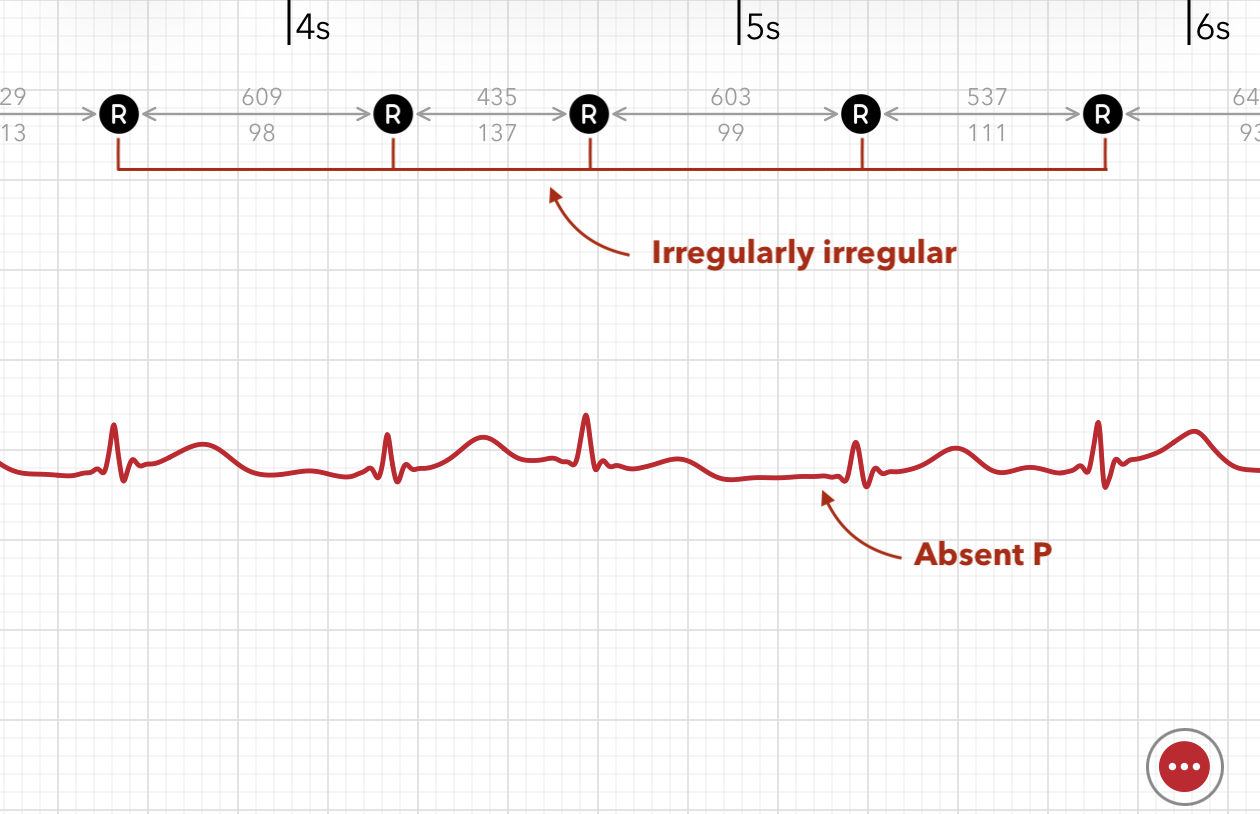
ECG+ reads the AFib classification directly from Apple HealthKit and pairs it with its own irregularity calculations, so you can see exactly how the rhythm looked in your recording.
What AFib can feel like
Many people with AFib have no symptoms at all and only find out through a routine check or, increasingly, through a wearable like Apple Watch. When symptoms do occur, they can include:
- Palpitations — a fluttering, racing, or irregular heartbeat sensation
- Fatigue — tiredness that seems out of proportion to your activity
- Shortness of breath — particularly during activity
- Dizziness or lightheadedness
If any of these are affecting your day-to-day life, that is worth mentioning to your doctor alongside the ECG recording.
Things that can trigger or worsen AFib
AFib episodes are often influenced by lifestyle factors. Common ones include:
- Alcohol — even moderate amounts can trigger episodes in some people
- Poor sleep or sleep apnoea
- High caffeine intake
- Stress or intense exercise
- Dehydration
Identifying your own patterns is genuinely useful — it is the kind of information your doctor will ask about.
Should I be concerned?
AFib is worth taking seriously, and unlike the occasional PVC or PAC, it does warrant a conversation with your doctor. That said, "taking it seriously" does not mean panic — it means getting the right information and, if needed, a plan.
AFib is one of the most common cardiac conditions there is. Cardiologists manage it every day, and the vast majority of people with AFib live full, active lives. What matters most is that you now know about it, which puts you in a much better position than not knowing.
A good next step
- Take a few more recordings over the next few days to see whether AFib appears again or was a one-off.
- Note any symptoms or triggers — what you were doing, how you felt, whether you had alcohol or poor sleep beforehand.
- Book a GP or cardiology appointment — ECG+ lets you export your recordings as a PDF report, so you arrive with real data, not just a description.
Frequently asked questions
How accurate is Apple Watch at detecting AFib?
The Apple Watch ECG app is cleared to flag atrial fibrillation and is reasonably reliable, but it can produce both false positives and false negatives and is not a diagnosis. A clinician confirms AFib with a 12-lead ECG or longer monitoring. If the app can't categorise a reading at all, it returns an inconclusive result instead.
What should I do if my Apple Watch says AFib?
Do not panic. Take a few more recordings, note any symptoms, and share the results with your doctor. Seek urgent medical care if you have chest pain, fainting, or severe shortness of breath.
Can AFib show up on Apple Watch and then disappear?
Yes. Paroxysmal AFib comes and goes, so a later normal recording does not rule it out. Taking recordings at different times improves the chance of capturing it.